An easy example on how to use Jetpack ViewModel and LiveData
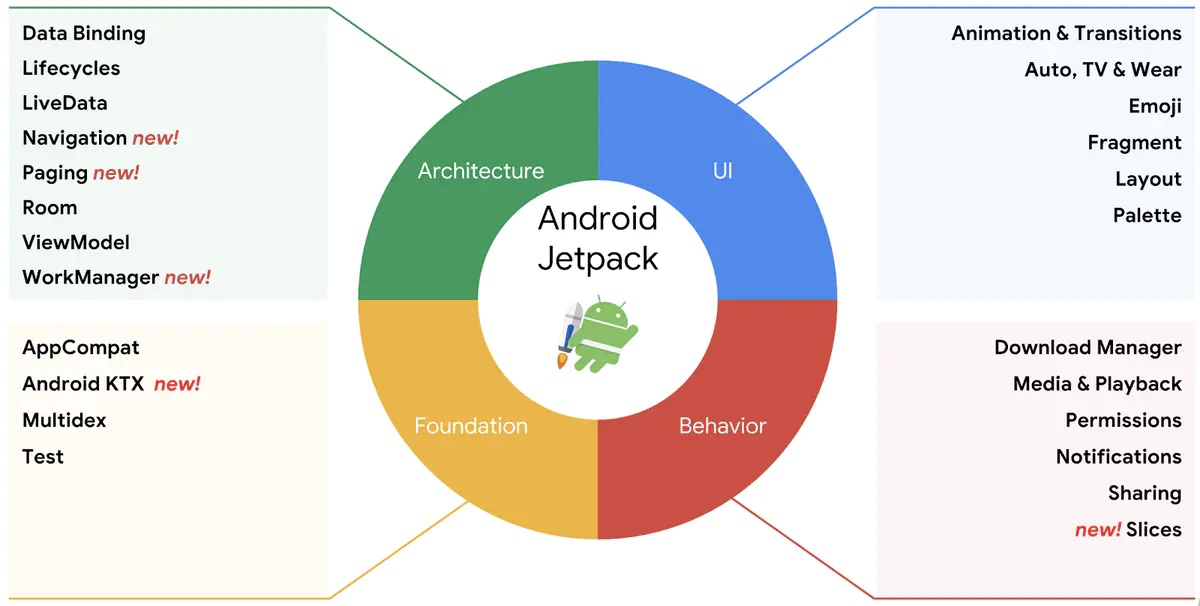
Jetpack broken up into four main areas: Architecture, Foundation, Behavior and UI.
ViewModel
ViewModel helped to achieve two things:
- help the project to adopt MVVM architecture
- hold the data in the memory in a life-cycle manner
One of the benefits of using ViewModel is the data can be kept while screen is rotated.
LiveData
LiveData can apply observer pattern to a variable, thus you can bind the data changes to the UI component.
One example of using both ViewModel and LiveData
We are going to create a simple example which only has three parts on the UI:
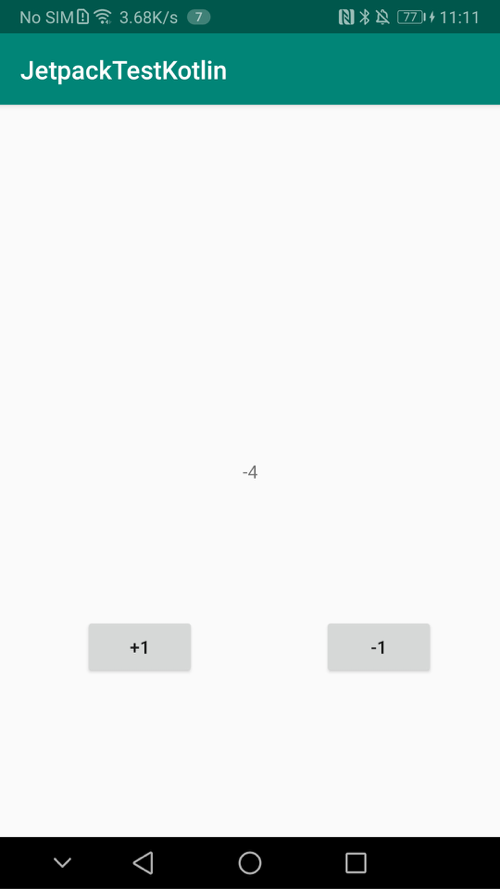
Simply as it is, +1 button will add the total value by 1, -1 button will minus the total by -1.
Step 1: install ViewModel and LiveData plugins.
On the Google Android's document website, you can install ViewModel along with lifecycle or you can just install the target plugin.
def lifecycle_version = "2.2.0"// ViewModel implementation “androidx.lifecycle:lifecycle-viewmodel-ktx:$lifecycle_version” implementation ‘androidx.lifecycle:lifecycle-extensions:$lifecycle_version’
// ViewModel implementation “androidx.lifecycle:lifecycle-viewmodel-ktx:$lifecycle_version” // LiveData implementation “androidx.lifecycle:lifecycle-livedata-ktx:$lifecycle_version” // Lifecycles only (without ViewModel or LiveData) implementation “androidx.lifecycle:lifecycle-runtime-ktx:$lifecycle_version”
// Saved state module for ViewModel implementation “androidx.lifecycle:lifecycle-viewmodel-savedstate:$lifecycle_version”
// Annotation processor kapt “androidx.lifecycle:lifecycle-compiler:$lifecycle_version” // alternately - if using Java8, use the following instead of lifecycle-compiler implementation “androidx.lifecycle:lifecycle-common-java8:$lifecycle_version”
// optional - helpers for implementing LifecycleOwner in a Service implementation “androidx.lifecycle:lifecycle-service:$lifecycle_version”
// optional - ProcessLifecycleOwner provides a lifecycle for the whole application process implementation “androidx.lifecycle:lifecycle-process:$lifecycle_version”
// optional - ReactiveStreams support for LiveData implementation “androidx.lifecycle:lifecycle-reactivestreams-ktx:$lifecycle_version”
// optional - Test helpers for LiveData testImplementation “androidx.arch.core:core-testing:$arch_version”
I would recommend to install the following two plugins if you are only use ViewModel and LiveData:
// ViewModel
implementation "androidx.lifecycle:lifecycle-viewmodel-ktx:$lifecycle_version"
implementation "androidx.lifecycle:lifecycle-livedata-ktx:$lifecycle_version"
Step 2: MyViewModel.kt
Create the ViewModel inherited from ViewModel class with only one observable variable inside: num, which is used to hold the total shown in the screenshot.
package com.flyingbits.kotlinlearnimport androidx.lifecycle.MutableLiveData import androidx.lifecycle.ViewModel
class MyViewModel: ViewModel() {
private var num: MutableLiveData<Int> = MutableLiveData(0) public fun getNum(): MutableLiveData<Int> { return this.num } public fun addNum(n: Int) { this.num.value = this.num.value!! + n }
}
Step 3: MainActivity.kt
Here is the complete code for MainActivity:
package com.flyingbits.kotlinlearnimport android.os.Bundle import android.util.Log import android.view.View import android.widget.Button import android.widget.TextView import androidx.appcompat.app.AppCompatActivity import androidx.fragment.app.FragmentManager import androidx.fragment.app.FragmentTransaction import androidx.lifecycle.Observer import androidx.lifecycle.ViewModelProvider import androidx.lifecycle.ViewModelProviders
class MainActivity : AppCompatActivity() {
private var myViewModel: MyViewModel? = null private val TAG: String = "Running Order" private var btn1: Button? = null private var btn2: Button? = null private var textView: TextView? = null override fun onCreate(savedInstanceState: Bundle?) { super.onCreate(savedInstanceState) setContentView(R.layout.activity_main) Log.d(TAG, "onCreate in called") myViewModel = ViewModelProvider(this)[MyViewModel::class.java] btn1 = findViewById(R.id.button1) btn2 = findViewById(R.id.button2) textView = findViewById(R.id.textView) myViewModel!!.getNum().observe(this, Observer<Int>() { textView?.setText(myViewModel!!.getNum().value.toString()) }) btn1?.setOnClickListener { myViewModel!!.addNum(1) } btn2?.setOnClickListener { myViewModel!!.addNum(-1) } }
}
Step 4: Layout of the MainActivity
<?xml version="1.0" encoding="utf-8"?> <androidx.constraintlayout.widget.ConstraintLayout xmlns:android="http://schemas.android.com/apk/res/android" xmlns:app="http://schemas.android.com/apk/res-auto" xmlns:tools="http://schemas.android.com/tools" android:layout_width="match_parent" android:layout_height="match_parent" tools:context=".MainActivity"><TextView android:layout_width="wrap_content" android:layout_height="wrap_content" android:text="Hello World!" android:id="@+id/text_view" app:layout_constraintBottom_toBottomOf="parent" app:layout_constraintLeft_toLeftOf="parent" app:layout_constraintRight_toRightOf="parent" app:layout_constraintTop_toTopOf="parent" /> <Button android:id="@+id/button_add" android:layout_width="wrap_content" android:layout_height="wrap_content" android:text="+1" app:layout_constraintBottom_toBottomOf="parent" app:layout_constraintEnd_toEndOf="parent" app:layout_constraintHorizontal_bias="0.216" app:layout_constraintStart_toStartOf="parent" app:layout_constraintTop_toTopOf="parent" app:layout_constraintVertical_bias="0.762" /> <Button android:id="@+id/button_minus" android:layout_width="wrap_content" android:layout_height="wrap_content" android:text="-1" app:layout_constraintBottom_toBottomOf="parent" app:layout_constraintEnd_toEndOf="parent" app:layout_constraintHorizontal_bias="0.832" app:layout_constraintStart_toStartOf="parent" app:layout_constraintTop_toTopOf="parent" app:layout_constraintVertical_bias="0.762" />
</androidx.constraintlayout.widget.ConstraintLayout>
By far you have successfully implemented the viewModel and liveData in your project.
- If you are running the app now, you can see +1 button will increase the total value, -1 button will reduce value.
- If the screen is rotated, the total value will kept on the screen.
The complete project you can download from: https://github.com/arkilis/jetpack-mvvm
Reference
- GHOST_URL/an-easy-example-on-how-to-use-viewmodel-and-livedata